01UNIQUE CONTROL
PS5
Wake consoles remotely
When a table opens, its PS5 automatically wakes from rest mode. When time runs out or the table closes, it returns to rest mode.
One command, automatic flow
Wake consoles remotely, control their screens and prevent unauthorized use. Bring finance, stock and shift operations together in one place.
Taxes included · Flexible pricing by table count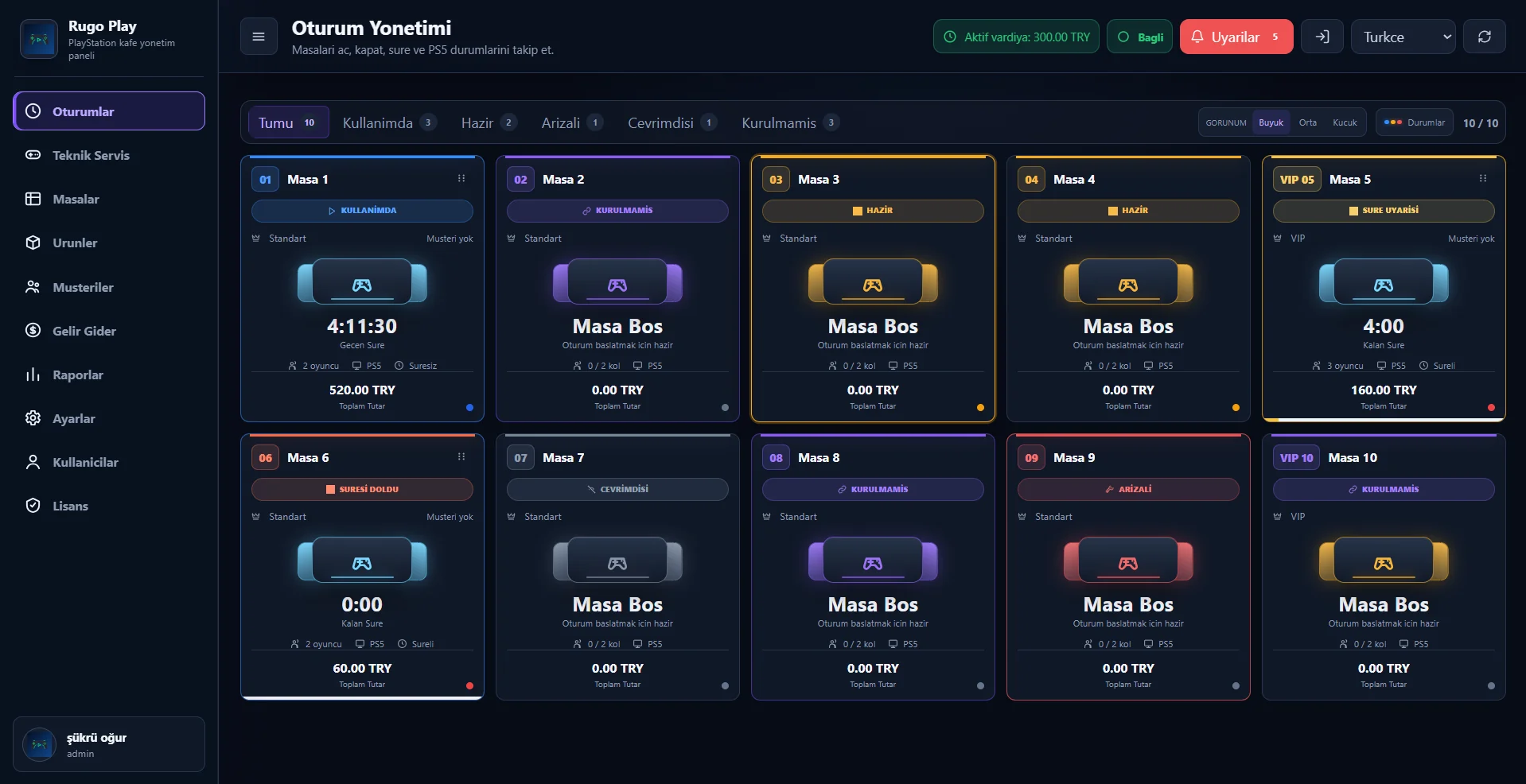
RugoPLAY combines daily business tools with real console control. Less walking, faster service and safer operations.
When a table opens, its PS5 automatically wakes from rest mode. When time runs out or the table closes, it returns to rest mode.
Launch games, navigate menus and handle console tasks directly through RugoPLAY.
Consoles cannot be used without approval. Prevent off-system sessions and reduce revenue loss.
Monitor live table statuses, manage time and billing, and reach every control for the selected table from the same screen.
Track every table's in-use, ready, offline and fault status in one view.
See your cash flow in real time.
01Set access for every team member.
02Track sales and low-stock items.
03Get detailed, decision-ready reports.
04Manage customer profiles and history.
05Keep staff and cash handovers tidy.
06Select the relevant table and console from the dashboard.
→Start a timed or open-ended session with one tap.
→Console, time and billing stay perfectly in sync.
A basic Windows computer is all you need. To get started, the computer and PS5 consoles only need to be connected to the same local network, wired or wirelessly.
Request a free demo →No setup fee. Select your table count and see your monthly price instantly.
RugoPLAY works in Turkish, English, Spanish and Arabic. The Arabic interface is fully optimized for right-to-left use.
Explore practical information about PS5 control, installation, pricing and support.
Practical guides for running a safer, more efficient and measurable PlayStation café—from console control to revenue and inventory operations.
Console control is focused on PS5. We review your current setup together during the demo.
The timed session closes automatically and the related PS5 returns to rest mode.
No. User-based permissions let you define exactly what each team member can see and do.
Yes. Per-table and monthly totals shown in the calculator include all taxes.
A venue-specific installation and onboarding plan is confirmed after the demo.
Tell us your table count and how to reach you. Let's plan the ideal setup and workflow for your business.